

About "Chromatic Glass - Web Edition"
Chromatic Glass helps people with color vision deficiency (protan, deutan, and tritan types) tell colors apart more easily. It changes colors of the camera image or of an image file in real time. It changes only the necessary parts, keeping the original colors as much as possible, so that colors that are hard to tell apart look clearly different. This is a web application coded with HTML5 + JavaScript, based on the smartphone edition of "Chromatic Glass", and it works without installing any software if there is a corresponding web browser.
Please see the "Chromatic Glass" Web Site and Kazunori Asada Web Site for details of the method and color vision terms.
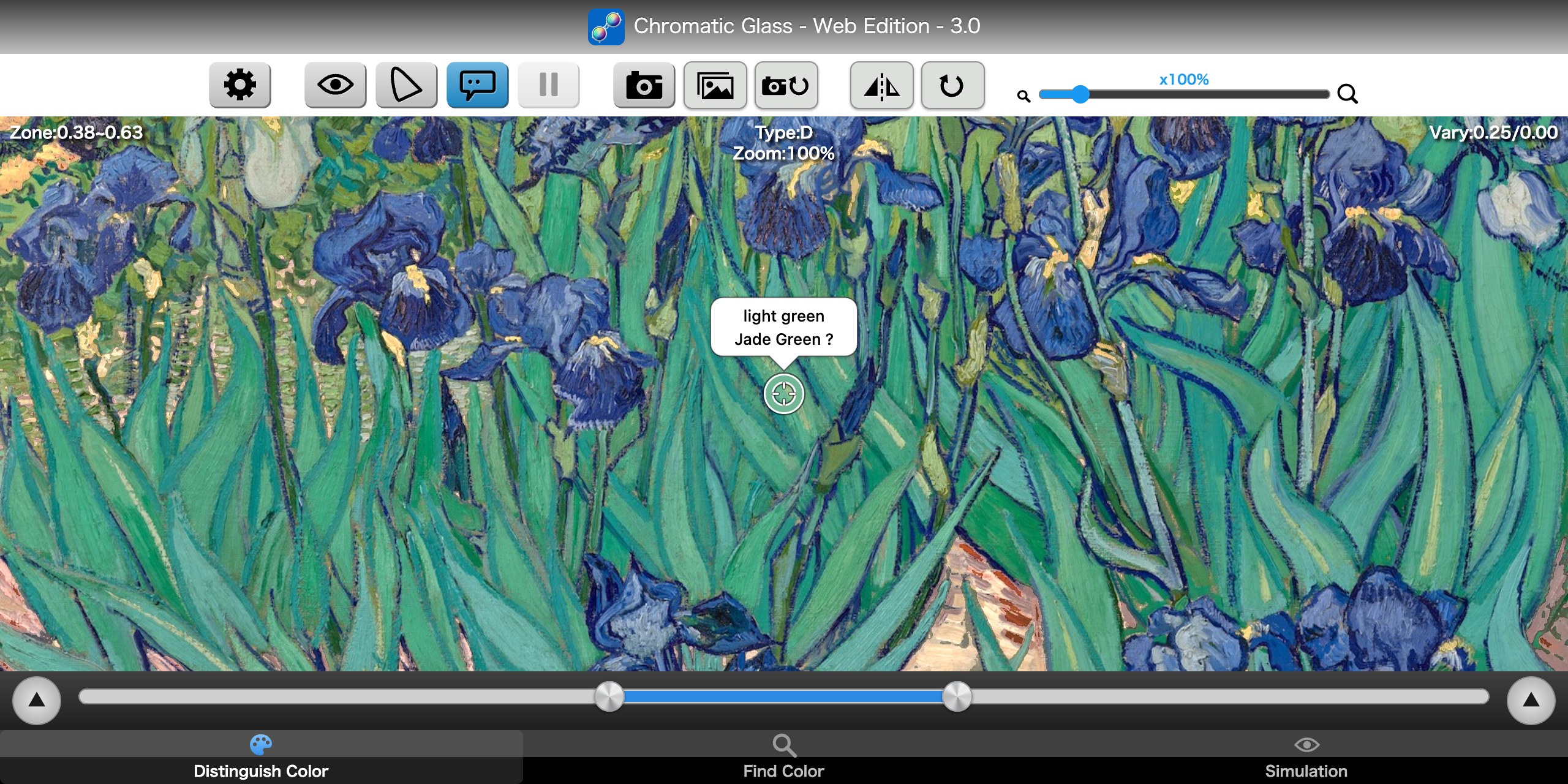
Three Modes
- Distinguish Color
- Makes colors that people of the P, D, and T types tend to confuse easier to tell apart. The app builds "color zones" along the confusion lines (lines connecting confused colors), and changes the colors in the zone into the most distinguishable ones, keeping the original colors as much as possible. Zones and changes are calculated in a perceptually uniform color space (CIELUV). The changed image is shown alternately with the original image, so the changed parts look as if they blink (0.33 seconds changed, 0.5 seconds original). This is the mode when you open the page for the first time.
- Find Color
- Changes only the colors close to the cursor color, or to one of the basic 11 colors, so you can find similar colors in the image. "Close" ignores the difference in brightness and uses closeness of hue (the distance is measured in u'v' chromaticity).
- Simulation
- Calculates how people of the P, D, and T color vision types may see colors, and shows it to people with common color vision (type C). It helps to understand which colors are hard to distinguish.
Buttons at the Top
 Settings
- Opens the Settings screen.
 Simulation
- Shows the image changed in Distinguish Color or Find Color as it may appear for the simulation color vision type and strength.
 Chromaticity Diagram
- Shows an xy or u'v' chromaticity diagram at the lower left. Choose which in Settings. The small ring on the diagram is the position of the color under the cursor.
 Color Name
- Shows the name of the color under the cursor (the color name pop-up). In browsers that do not support WebAssembly (WasmGC), this button is not shown.
 Freeze
- Stops the video. Press again to resume. Unavailable for image files.
 Save
- Saves the currently displayed image, after the color change, as a JPEG.

 File / Camera
- The left button opens a file (still picture). The right button returns to the camera (video) while a file is shown; while the camera is shown and the device has more than one camera, it switches to the next camera.

 Mirror / Rotation
- Mirror flips the image horizontally. Rotation turns it 90 degrees clockwise at a time.

 Zoom (x100% - x500%)
- Digital zoom. At 100% the image fills the screen without gray margins.
The Bottom Bar and Operations
- Mode tabs (at the bottom)
- Switch among Distinguish Color, Find Color and Simulation (the page opens in the mode you used last).
- Zone range slider (Distinguish Color)
- Sets the range of colors to change. It has two thumbs, left and right; hold the part between them (blue) to move the whole range. The far left (0.0) is the side containing green, and the far right (1.0) is the side containing red (for type T, blue on the left and green on the right). Double-click (double-tap) to turn the range on and off.
- Color change slider and color vision type
- Opened and closed with the right "▲". Move the thumb inside the circle. The distance from the center is the variation (0.0 to 0.5), and the clockwise angle from the top is the direction (0.0 to 1.0). Double-click (double-tap) the thumb to turn Boost Mode (a strong change) on and off (not in Find Color). Choose the color vision type (P, D, or T) with the vertical selector beside the circle.
- Presets
- Stores the parameters of Distinguish Color (the zone, the strength and direction of the color change, and the five switches) as a set. You can keep up to eight sets. Open the menu with the left "▲" and choose one to load its parameters. Press and hold an item for about two seconds to save the current parameters to it. You can also edit the names and values in "Preset Parameters" in Settings, and restore the initial values.
- Searching radius slider and basic 11 colors (Find Color)
- Sets how far from the color to search. A small value finds only close colors, and a large one also finds different colors. Click (tap) one of the basic 11 colors on the lower bar (achromatic, red, yellow-red, yellow, yellow-green, green, blue-green, blue, purple-blue, purple, red-purple), or choose it from the left "▲" menu, to search for that color.
- Color vision type and strength (Simulation)
- Choose the color vision type (C, P, D, or T). C shows the original image. The strength slider is 0.0 for no simulation and 1.0 for full simulation. It does not simulate anomalous trichromacy (mild color vision deficiency).
- Image operations
- Click (tap) to move the cursor. Double-click (double-tap) returns the zoom, the position and the cursor to the initial state. While a file is shown or the video is frozen, drag moves the image. The mouse wheel zooms by a constant ratio per step. A trackpad pinch or a two-finger pinch zooms in and out (up to x500%). Press and hold the video for one second to freeze it (this can be turned off in Settings). After 10 seconds without operation, the texts disappear except the cursor, the color name pop-up, the chromaticity diagram and the basic 11 colors ribbon; click (tap) to show them again.
Color Names (Color Cursor)
Turn on "Color Name" at the top (or "Show Color Name" in Settings) to show the cursor and the name of the color under it in the original image. Choose the content of the four lines in Settings (JIS systematic and traditional color names, ISCC-NBS systematic names, TCCA traditional names, CIELAB, Oklab, CIELUV, RGB, XYZ, xyY, Munsell, or none). The color under the cursor is a weighted average over about 5 by 5 pixels (Gaussian filter). Values and names assume the image is in sRGB under a D65 light source, and follow the standards, but they are not necessarily accurate. It works only in browsers that support WebAssembly (WasmGC).
Settings
In Settings you can choose whether to embed texts (the mode and parameters) in saved images, press-and-hold to freeze, the color name display and its four lines, the color changing options (Auto Color Zone, Reverse Color Zone, Inversion on Both Sides, Keep Achromatic Zone, Boost Mode), Zone allocation, the chromaticity diagram (xy / u'v'), the language, the color space, the preset settings, and reset. Settings are saved in this browser.
Images changed by this software and simulated images are calculated with specific methods and conditions, and do not necessarily represent how colors actually look. Please use them as a guide. Colors are changed by dividing colors along the confusion lines and changing them in a perceptually uniform color space (CIELUV). The simulation is based on the method of Brettel, Viénot and Mollon (Journal of the Optical Society of America A, vol.14, no.10, 1997).
A web browser which supports WebGL 2 is required. The web camera only works when WebRTC is supported and the page is opened over HTTPS.
Licenses
This software uses the font below. The full text of the license follows.
- Roboto Bold font (a subset of Latin characters): Copyright 2011 Google Inc. All Rights Reserved. (Apache-2.0)
Apache License, Version 2.0
「色のめがね - Web Edition」について
「色のめがね」は、色の見分けにくさのある方(P 型・D 型・T 型の色覚)が、色を見分けやすくするためのソフトウェアです。カメラの映像や画像ファイルの色を、リアルタイムに変更して表示します。見分けにくい色どうしがはっきり違って見えるように、元の色を可能な限り保ったまま、必要な部分だけ色を変更します。スマートフォン用の「色のめがね」をベースに、HTML5 + JavaScript で作られた Web アプリケーションで、対応するウェブブラウザがあれば、ソフトウェアをインストールせずに動作します。
変更の手法や色覚用語等の詳細については、「色のめがね」のウェブサイトや浅田一憲のウェブサイトをご覧ください。
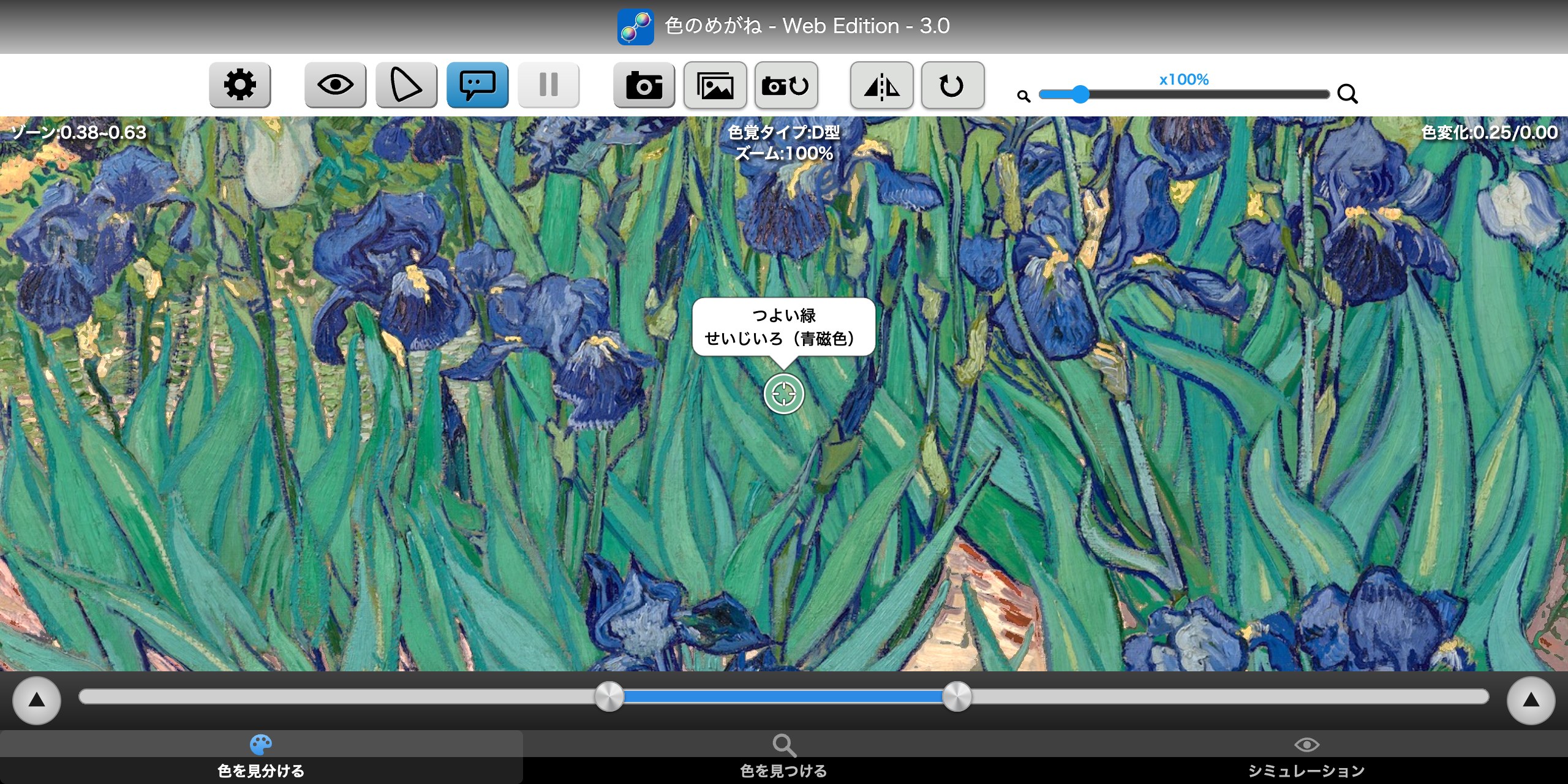
3 つのモード
- 色を見分ける
- P 型・D 型・T 型の方が混同しやすい色を、見分けやすくします。混同しやすい色を結んだ「混同色線」に沿って「カラーゾーン」を決め、その中の色を、元の色を可能な限り保ったまま、いちばん見分けやすい色に変更します。色の区切りと変更は、人の感覚に合う均等色空間(CIELUV)の上で計算しています。変更した画像は、元の画像と交互に点滅するように表示されます(変更後 0.33 秒、元の画像 0.5 秒)。初めて開いたときは、このモードです。
- 色を見つける
- カーソルの色や、基本の 11 色から選択した色に近い色だけを変更して、画像の中から似た色を見つけます。「近い」は、明るさの違いを考えず、色みの近さで決めます(距離は u'v' 色度で測ります)。
- シミュレーション
- P・D・T の色覚タイプの方に見えているであろう色を計算で予測して、一般型色覚(C 型)の方に表示します。どの色が見分けにくいのかを知る助けになります。
上のボタン
- 設定
- 設定の画面を表示します。
- シミュレーション
- 「色を見分ける」「色を見つける」で色を変更した画像を、シミュレーションの色覚タイプ・強度で見え方を予測して表示します。
- 色度図
- 画面の左下に、xy 色度図または u'v' 色度図を表示します。表示するのはどちらかを、設定で選択します。図の上の小さな輪は、カーソルの下の色の位置です。
- 色名
- カーソルの下の色の名前(色名の吹き出し)を表示します。WebAssembly(WasmGC)に対応していないブラウザーでは、このボタンは表示されません。
- 静止
- 映像を止めます。もう一度押すと再開します。ファイルの画像のときは押せません。
- 保存
- いま表示している、色を変更した後の画像を JPEG で保存します。
- ファイル・カメラ
- 左のボタンは、ファイル(静止画像)を開きます。右のボタンは、ファイルを見ている時はカメラ(動画像)に戻し、カメラを見ている時でカメラが複数あるデバイスでは、次のカメラに切り替えます。
- ミラー・回転
- ミラーは左右反転した画像を表示します。回転は、押すたびに時計回りに90度回転した画像を表示します。
- ズーム(x100%~x500%)
- デジタルズームの倍率です。100% は、灰色の余白が表示されないように画面を画像で埋めます。
下の帯と操作
- モードのタブ(画面の一番下)
- 「色を見分ける」「色を見つける」「シミュレーション」を切り替えます(開いたときは、前回のモードです)。
- ゾーン範囲スライダー(色を見分ける)
- 色を変更する範囲を決めます。つまみは左右に 2 つあり、つまみの間(青い部分)をつかむと範囲ごと動きます。いちばん左(0.0)は緑を含む側、いちばん右(1.0)は赤を含む側です(T 型は、左が青側、右が緑側)。ダブルクリック(ダブルタップ)で、範囲の入・切を切り替えます。
- 変化の円形スライダーと色覚タイプ
- 右の「▲」で開閉します。円の中でつまみを動かします。中心からの距離が「色変化の強さ」(0.0〜0.5)、真上から時計回りの角度が「色変化の方向」(0.0〜1.0)です。つまみをダブルクリック(ダブルタップ)すると、ブーストモード(強い変更)の入・切を切り替えます(「色を見つける」にはありません)。色覚タイプ(P・D・T)は、円の横の縦の切り替えで選びます。
- プリセット
- 「色を見分ける」のパラメータ(ゾーン・色変化の強さと方向・スイッチ 5 つ)を、8 組まで覚えておく機能です。左の「▲」でメニューを開いて選ぶと、そのパラメータを読み込みます。項目を約 2 秒長押しすると、いまのパラメータをそのプリセットに保存します。名前や値は、設定の「プリセット設定」でも編集でき、初期値に戻せます。
- 探す範囲のスライダー・基本 11 色(色を見つける)
- 探す範囲(半径)を決めます。値が小さいほど近い色だけを、大きいほど違う色まで探します。画面の下の帯の基本 11 色(無彩色・赤・黄赤・黄・黄緑・緑・青緑・青・青紫・紫・赤紫)をタップするか、左の「▲」のメニューから選ぶと、その色を探します。
- 色覚タイプ・強度(シミュレーション)
- 色覚タイプ(C・P・D・T)を選びます。C は元の画像のままです。強度スライダーは、0.0 でシミュレーションなし、1.0 で完全なシミュレーションです。異常 3 色覚(弱度の色覚異常)の見え方をシミュレーションするものではありません。
- 画像の操作
- クリック(タップ)でカーソルが動きます。ダブルクリック(ダブルタップ)で、ズーム・位置・カーソルを元に戻します。ファイルを見ている時や静止している時は、ドラッグで画像を動かせます。マウスのホイールで、一定の比率でズームします。トラックパッドのピンチや 2 本指のピンチで、拡大・縮小します(最大 500%)。映像を 1 秒長押しすると静止します(設定で切れます)。操作しないまま 10 秒たつと、カーソル・色名の吹き出し・色度図・基本 11 色の帯を除く文字が消え、クリック(タップ)すると表示されます。
色名の表示(カラーカーソル)
上のボタンの「色名」(または設定の「色名の表示」)をオンにすると、カーソルと、その下の元の画像の色の名前を表示します。吹き出しの 4 行の内容は、設定の「色名の表示」で選びます(系統色名・慣用色名(JIS)、ISCC-NBS の系統色名、TCCA の慣用色名、CIELAB・Oklab・CIELUV・RGB・XYZ・xyY・Munsell、なし)。カーソルの位置の色は、縦横 5×5 画素ほどの広さのガウシアンフィルタで、重みを付けて平均した色です。色の値と名前は、画像の色空間が sRGB、光源が D65 という前提で、各規格に基づいて計算したものです。必ずしも正確とは限りません。WebAssembly(WasmGC)に対応したブラウザーだけで使えます。
設定
設定では、保存した画像に文字(モード・パラメータ)を埋め込むか、長押しで静止、色名の表示と 4 行の内容、色変更オプション(自動カラーゾーン・カラーゾーンを反転・無彩色を境に変更色反転・無彩色ゾーンは色を保持・ブーストモード)、ゾーンの割り振り、表示する色度図(xy/u'v')、言語、色空間、プリセット設定、リセットを設定できます。設定は、このブラウザーに保存されます。
色を変更した画像やシミュレーション画像は、特定の手法と条件のもとで計算したものであり、見え方を正確に表すとは限りません。目安としてお使いください。変更の手法は、混同色線に基づく色の区切りと、均等色空間(CIELUV)上の変更です。シミュレーションは、Brettel・Viénot・Mollon の手法(Journal of the Optical Society of America A, vol.14, no.10, 1997)に基づいています。
WebGL 2 をサポートしているウェブブラウザが必要です。ウェブカメラは、WebRTC をサポートし、ページを HTTPS で開いた時だけ動作します。
ライセンス
このソフトウェアは、次のフォントを使用しています。ライセンスの全文は次のとおりです。
- フォント Roboto Bold(ラテン文字の一部): Copyright 2011 Google Inc. All Rights Reserved.(Apache-2.0)
Apache License, Version 2.0
                                 Apache License
                           Version 2.0, January 2004
                        http://www.apache.org/licenses/

   TERMS AND CONDITIONS FOR USE, REPRODUCTION, AND DISTRIBUTION

   1. Definitions.

      "License" shall mean the terms and conditions for use, reproduction,
      and distribution as defined by Sections 1 through 9 of this document.

      "Licensor" shall mean the copyright owner or entity authorized by
      the copyright owner that is granting the License.

      "Legal Entity" shall mean the union of the acting entity and all
      other entities that control, are controlled by, or are under common
      control with that entity. For the purposes of this definition,
      "control" means (i) the power, direct or indirect, to cause the
      direction or management of such entity, whether by contract or
      otherwise, or (ii) ownership of fifty percent (50%) or more of the
      outstanding shares, or (iii) beneficial ownership of such entity.

      "You" (or "Your") shall mean an individual or Legal Entity
      exercising permissions granted by this License.

      "Source" form shall mean the preferred form for making modifications,
      including but not limited to software source code, documentation
      source, and configuration files.

      "Object" form shall mean any form resulting from mechanical
      transformation or translation of a Source form, including but
      not limited to compiled object code, generated documentation,
      and conversions to other media types.

      "Work" shall mean the work of authorship, whether in Source or
      Object form, made available under the License, as indicated by a
      copyright notice that is included in or attached to the work
      (an example is provided in the Appendix below).

      "Derivative Works" shall mean any work, whether in Source or Object
      form, that is based on (or derived from) the Work and for which the
      editorial revisions, annotations, elaborations, or other modifications
      represent, as a whole, an original work of authorship. For the purposes
      of this License, Derivative Works shall not include works that remain
      separable from, or merely link (or bind by name) to the interfaces of,
      the Work and Derivative Works thereof.

      "Contribution" shall mean any work of authorship, including
      the original version of the Work and any modifications or additions
      to that Work or Derivative Works thereof, that is intentionally
      submitted to Licensor for inclusion in the Work by the copyright owner
      or by an individual or Legal Entity authorized to submit on behalf of
      the copyright owner. For the purposes of this definition, "submitted"
      means any form of electronic, verbal, or written communication sent
      to the Licensor or its representatives, including but not limited to
      communication on electronic mailing lists, source code control systems,
      and issue tracking systems that are managed by, or on behalf of, the
      Licensor for the purpose of discussing and improving the Work, but
      excluding communication that is conspicuously marked or otherwise
      designated in writing by the copyright owner as "Not a Contribution."

      "Contributor" shall mean Licensor and any individual or Legal Entity
      on behalf of whom a Contribution has been received by Licensor and
      subsequently incorporated within the Work.

   2. Grant of Copyright License. Subject to the terms and conditions of
      this License, each Contributor hereby grants to You a perpetual,
      worldwide, non-exclusive, no-charge, royalty-free, irrevocable
      copyright license to reproduce, prepare Derivative Works of,
      publicly display, publicly perform, sublicense, and distribute the
      Work and such Derivative Works in Source or Object form.

   3. Grant of Patent License. Subject to the terms and conditions of
      this License, each Contributor hereby grants to You a perpetual,
      worldwide, non-exclusive, no-charge, royalty-free, irrevocable
      (except as stated in this section) patent license to make, have made,
      use, offer to sell, sell, import, and otherwise transfer the Work,
      where such license applies only to those patent claims licensable
      by such Contributor that are necessarily infringed by their
      Contribution(s) alone or by combination of their Contribution(s)
      with the Work to which such Contribution(s) was submitted. If You
      institute patent litigation against any entity (including a
      cross-claim or counterclaim in a lawsuit) alleging that the Work
      or a Contribution incorporated within the Work constitutes direct
      or contributory patent infringement, then any patent licenses
      granted to You under this License for that Work shall terminate
      as of the date such litigation is filed.

   4. Redistribution. You may reproduce and distribute copies of the
      Work or Derivative Works thereof in any medium, with or without
      modifications, and in Source or Object form, provided that You
      meet the following conditions:

      (a) You must give any other recipients of the Work or
          Derivative Works a copy of this License; and

      (b) You must cause any modified files to carry prominent notices
          stating that You changed the files; and

      (c) You must retain, in the Source form of any Derivative Works
          that You distribute, all copyright, patent, trademark, and
          attribution notices from the Source form of the Work,
          excluding those notices that do not pertain to any part of
          the Derivative Works; and

      (d) If the Work includes a "NOTICE" text file as part of its
          distribution, then any Derivative Works that You distribute must
          include a readable copy of the attribution notices contained
          within such NOTICE file, excluding those notices that do not
          pertain to any part of the Derivative Works, in at least one
          of the following places: within a NOTICE text file distributed
          as part of the Derivative Works; within the Source form or
          documentation, if provided along with the Derivative Works; or,
          within a display generated by the Derivative Works, if and
          wherever such third-party notices normally appear. The contents
          of the NOTICE file are for informational purposes only and
          do not modify the License. You may add Your own attribution
          notices within Derivative Works that You distribute, alongside
          or as an addendum to the NOTICE text from the Work, provided
          that such additional attribution notices cannot be construed
          as modifying the License.

      You may add Your own copyright statement to Your modifications and
      may provide additional or different license terms and conditions
      for use, reproduction, or distribution of Your modifications, or
      for any such Derivative Works as a whole, provided Your use,
      reproduction, and distribution of the Work otherwise complies with
      the conditions stated in this License.

   5. Submission of Contributions. Unless You explicitly state otherwise,
      any Contribution intentionally submitted for inclusion in the Work
      by You to the Licensor shall be under the terms and conditions of
      this License, without any additional terms or conditions.
      Notwithstanding the above, nothing herein shall supersede or modify
      the terms of any separate license agreement you may have executed
      with Licensor regarding such Contributions.

   6. Trademarks. This License does not grant permission to use the trade
      names, trademarks, service marks, or product names of the Licensor,
      except as required for reasonable and customary use in describing the
      origin of the Work and reproducing the content of the NOTICE file.

   7. Disclaimer of Warranty. Unless required by applicable law or
      agreed to in writing, Licensor provides the Work (and each
      Contributor provides its Contributions) on an "AS IS" BASIS,
      WITHOUT WARRANTIES OR CONDITIONS OF ANY KIND, either express or
      implied, including, without limitation, any warranties or conditions
      of TITLE, NON-INFRINGEMENT, MERCHANTABILITY, or FITNESS FOR A
      PARTICULAR PURPOSE. You are solely responsible for determining the
      appropriateness of using or redistributing the Work and assume any
      risks associated with Your exercise of permissions under this License.

   8. Limitation of Liability. In no event and under no legal theory,
      whether in tort (including negligence), contract, or otherwise,
      unless required by applicable law (such as deliberate and grossly
      negligent acts) or agreed to in writing, shall any Contributor be
      liable to You for damages, including any direct, indirect, special,
      incidental, or consequential damages of any character arising as a
      result of this License or out of the use or inability to use the
      Work (including but not limited to damages for loss of goodwill,
      work stoppage, computer failure or malfunction, or any and all
      other commercial damages or losses), even if such Contributor
      has been advised of the possibility of such damages.

   9. Accepting Warranty or Additional Liability. While redistributing
      the Work or Derivative Works thereof, You may choose to offer,
      and charge a fee for, acceptance of support, warranty, indemnity,
      or other liability obligations and/or rights consistent with this
      License. However, in accepting such obligations, You may act only
      on Your own behalf and on Your sole responsibility, not on behalf
      of any other Contributor, and only if You agree to indemnify,
      defend, and hold each Contributor harmless for any liability
      incurred by, or claims asserted against, such Contributor by reason
      of your accepting any such warranty or additional liability.

   END OF TERMS AND CONDITIONS

   APPENDIX: How to apply the Apache License to your work.

      To apply the Apache License to your work, attach the following
      boilerplate notice, with the fields enclosed by brackets "[]"
      replaced with your own identifying information. (Don't include
      the brackets!)  The text should be enclosed in the appropriate
      comment syntax for the file format. We also recommend that a
      file or class name and description of purpose be included on the
      same "printed page" as the copyright notice for easier
      identification within third-party archives.

   Copyright [yyyy] [name of copyright owner]

   Licensed under the Apache License, Version 2.0 (the "License");
   you may not use this file except in compliance with the License.
   You may obtain a copy of the License at

       http://www.apache.org/licenses/LICENSE-2.0

   Unless required by applicable law or agreed to in writing, software
   distributed under the License is distributed on an "AS IS" BASIS,
   WITHOUT WARRANTIES OR CONDITIONS OF ANY KIND, either express or implied.
   See the License for the specific language governing permissions and
   limitations under the License.